
Free guide
Start your product brain
A do-it-yourself roadmap for product teams: give every person and every AI tool the same checked answers, so features stop slipping.
Anurag Kapse, founder, Rivora Connect · November 2026
An AI product brain is a shared memory of how your product works: the decisions, rules, code knowledge and clarifications behind it, which people and AI tools draw on when they design and build each feature.
Free, with no sign-up.
Read this first
This guide is a roadmap. It has six stages, from product knowledge scattered across heads and chats to one product brain your whole business trusts. You don't need all six at once. Find your stage, then do the next one.
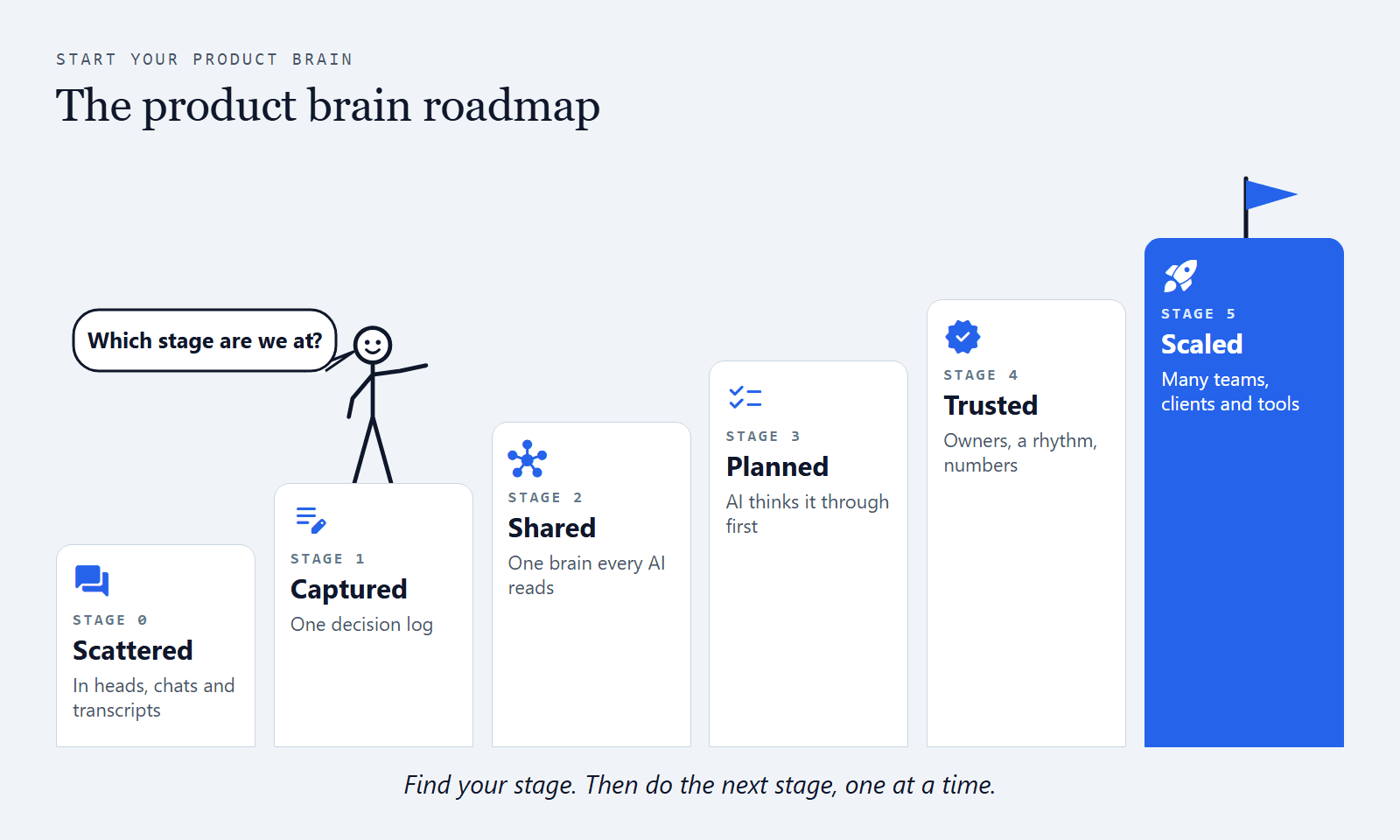
Open full size: The product brain roadmap (opens in a new tab)
What you'll get:
- Why delivery slips when everyone on the team uses AI, and how to see it in your own team
- The roadmap, with a card for each stage: where your knowledge lives, what your AI does, what you're stuck on, and how to graduate
- A decision log you can start today, and the five things every entry needs
- Nine planning steps that make AI think a feature through before it writes the plan
- Your first week, day by day, and three prompts to paste into Claude, Copilot or ChatGPT
- How to keep it trusted, and the signs that tell you it's working
- A free starter kit on GitHub with the folders, examples, the nine steps and four Claude Code skills: github.com/anurag-rivora/product-brain-starter (opens in a new tab)
How to use it:
- Read sections 1 to 3 first. They take about ten minutes and show you your stage.
- Do the next stage only. Each stage ends with a short "Graduate when" list. Move on once every box is ticked.
- Follow the links. Each section ends with free pages and tools on rivoraconnect.com.au that go deeper on that topic.
Sound familiar?
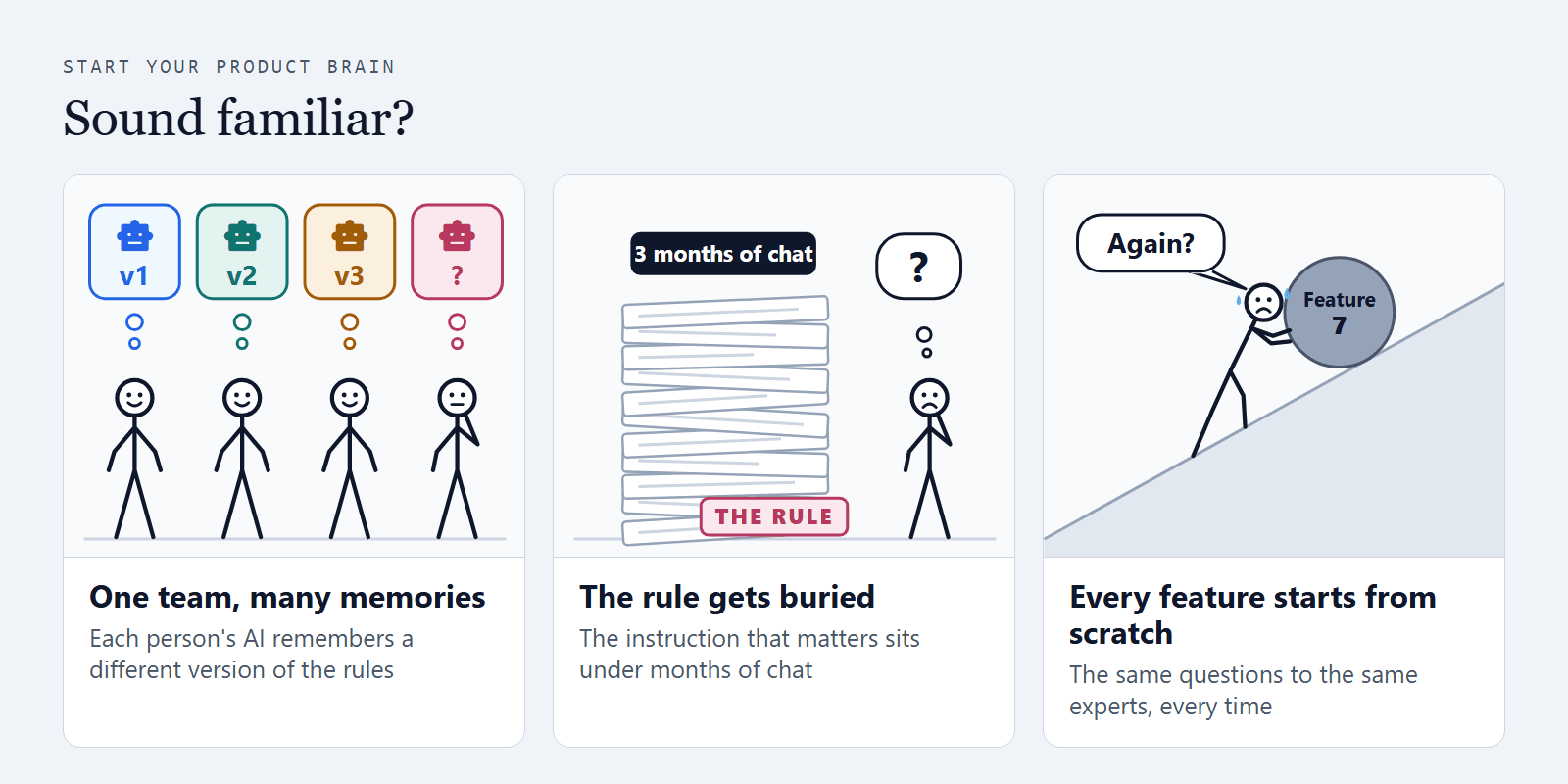
You expect one team. You've given it many memories. You expect your team to perform as one, while each person, and each person's AI, works from a separate memory. The PM's Claude chat, the engineer's Copilot, the designer's ChatGPT, the meeting note-taker's transcripts. None of them holds what the others know.
Your AI's instructions get buried. The rules that matter sit under three months of chat history and a context file that keeps growing. The more a model is told at once, the more it misses: in a 2025 study that gave 20 leading models up to 500 simple instructions at once, the best followed about 68% of them (IFScale, Distyl AI). Anthropic's own advice is to keep the CLAUDE.md file short. So the rule for one client gets skipped, and nobody notices until the build.
Every feature starts from scratch. You re-explain the product, dig through old tickets and ask the same expert again. Then you do it all again for the next feature.
Go deeper: Why AI tools guess your product's rules · Why product teams wait on the same experts
1. Why delivery slips when everyone uses AI
Leadership asks for predictable delivery. Teams reach for AI to move faster, and they do move faster. AI also assumes whatever nobody told it: the rule for one client, the edge case, the decision from last month. The plan looks complete, the build starts, and the gaps turn up as rework. The date moves.
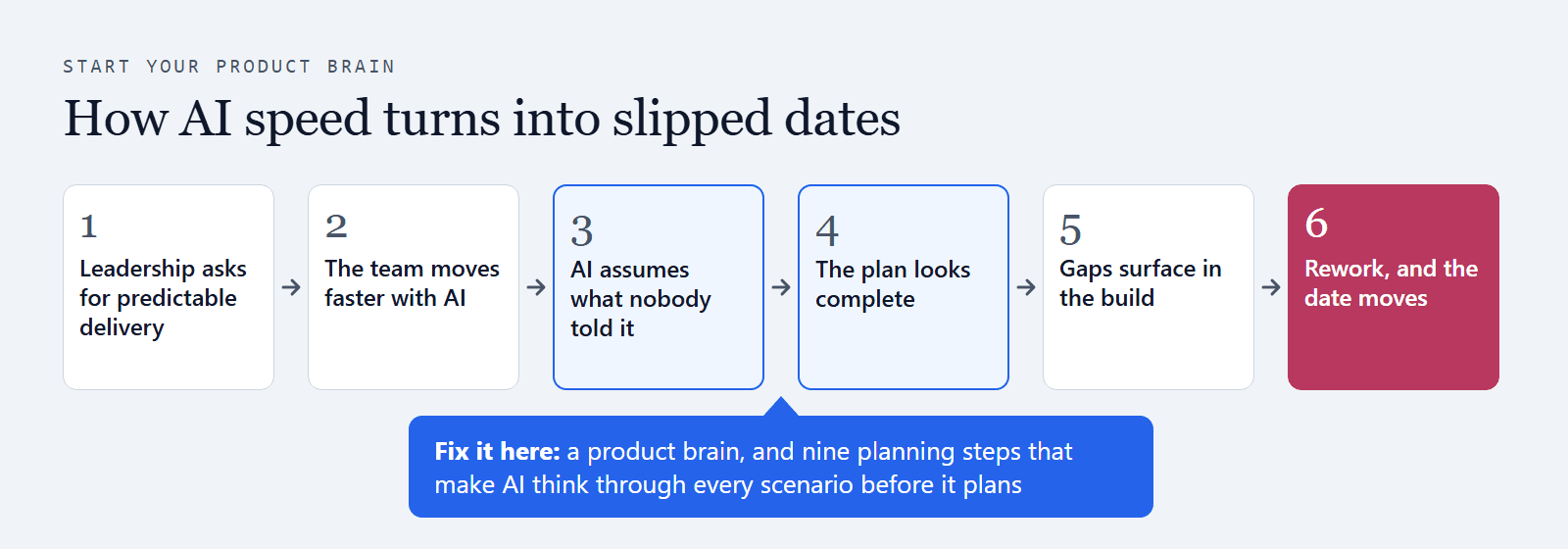
Open full size: How AI speed turns into slipped dates (opens in a new tab)
On an established product, the slow part is knowing the product: why it works the way it does, which rule applies to which client, what was decided last time, which code is still used. AI tools can only use what is written down, and the most important things about an established product never were.
Plenty of teams now record every meeting with an AI note-taker. The decisions sit in those transcripts, away from where the next feature starts. So each person re-explains the product to their own AI, and each AI fills the gaps differently.
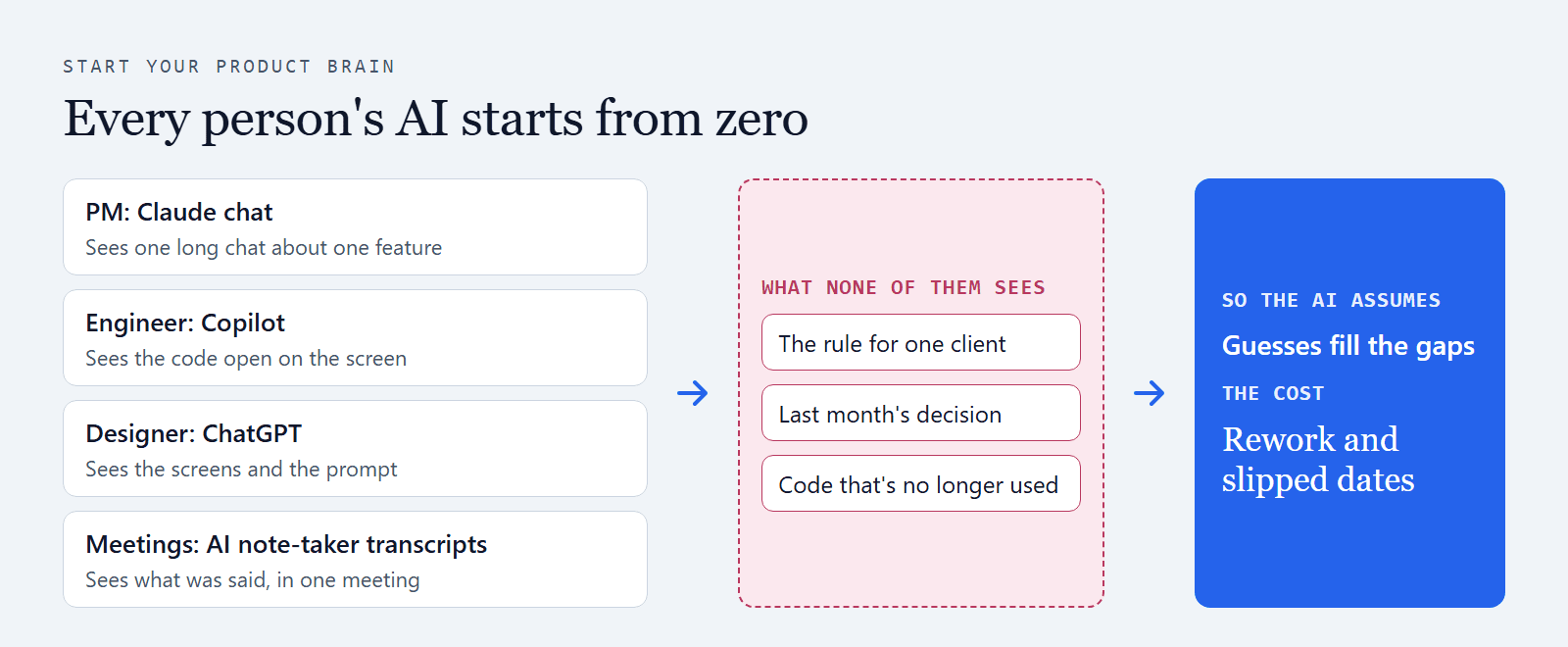
Open full size: Every person’s AI starts from zero (opens in a new tab)
What AI tools miss most:
- Decisions made in conversation: a meeting, a Slack thread or a call settles something, and it never reaches the ticket.
- Rules for one client, market or product line: everyone who has been around for years knows them; nobody wrote them down.
- Code that is still there but no longer used: a coding agent reads the code and treats all of it as current.
Predictable delivery means the plan accounts for everything before anyone builds. That needs two things: the product's knowledge in one checked place, and a way to make AI think through every scenario before it writes the plan. A product brain gives you both.
Go deeper: How to keep product decisions made in Slack · Keep product knowledge when experts leave
2. What a product brain is
An AI product brain is a shared memory of how your product works: the decisions, rules, code knowledge and clarifications behind it, which people and AI tools draw on when they design and build each feature.
Engineering solved this for code years ago: every change lives in one place, with its history, its reviewer and its reason. Product knowledge needs the same home.
| Kind | Example (made up) | Who usually knows |
|---|---|---|
| Decision | Example (made up)Customers on the legacy plan keep paper invoices until June 2027 | Who usually knowsThe PM or business owner who agreed it |
| Rule | Example (made up)Wholesale refunds need a second approver | Who usually knowsThe person who looks after that client or area |
| Code knowledge | Example (made up)The old pricing module is still in the repo, and nothing calls it any more | Who usually knowsA long-serving engineer or architect |
| Clarification | Example (made up)"Active customer" means a paid order in the last 90 days, for reporting only | Who usually knowsWhoever answered the question last time |
A product brain is more than a bigger context file or a Claude Project full of uploads. It decides what each AI tool reads for each piece of work, and only a person can make something count.
Go deeper: The AI product brain glossary · A team that builds fast needs one product brain · Claude Projects: alternative or add-on
3. You are here: find your stage
Every team sits on one of six stages. Each stage solves the problem of the one before, and each brings a new problem of its own. That's normal. The trick is knowing which problem you have now.
Your stage
Stage 0Scattered
Where every team starts
- Where it lives
- Heads, chats, tickets and transcripts
- Your AI
- Starts from zero in every chat
- Stuck on
- The same questions to the same experts
- Graduate by
- Writing decisions down in one log
| Stage | Where your knowledge lives | You're stuck on | You graduate by |
|---|---|---|---|
| 0. Scattered | Where your knowledge livesHeads, chats, tickets and transcripts | You're stuck onThe same questions to the same experts | You graduate byWriting decisions down in one log |
| 1. Captured | Where your knowledge livesOne decision log | You're stuck onCopies drift, and each AI tool has its own | You graduate byOne brain every person and AI reads |
| 2. Shared | Where your knowledge livesOne shared folder or repository | You're stuck onPlans still assume what nobody asked | You graduate byPlanning every feature in nine steps |
| 3. Planned | Where your knowledge livesThe brain, plus a record for each feature | You're stuck onKeeping it current takes time nobody has | You graduate byOwners, a rhythm and health numbers |
| 4. Trusted | Where your knowledge livesEvery entry has an owner and a review date | You're stuck onThe work multiplies with people, clients and tools | You graduate byA system that keeps it current for you |
| 5. Scaled | Where your knowledge livesOne brain across teams, clients and products | You're stuck onRivora keeps it current, and your owners approve what counts | You graduate byThe top of the roadmap: keep building |
Which sentence sounds like your team?
- "Our AI starts from zero in every chat." You're at Stage 0.
- "We write decisions down, but each tool gets its own copy." Stage 1.
- "Every AI reads the same brain, but plans still miss things." Stage 2.
- "We plan features step by step, but nobody has time to keep the brain current." Stage 3.
- "We have owners, a rhythm and numbers, and the work keeps growing." Stage 4.
Three questions to check your answer:
- On your last feature, who did you have to ask before you could start?
- Where did the decisions from that feature end up?
- If a coding agent started your next feature today, which of those decisions would it see?
Two free checks, no sign-up: the Feature readiness check shows the questions to answer before you build, and the gaps they reveal. The Expert queue calculator shows what waiting on a few people costs your team, from your own numbers.
4. Stage 1, Captured: start your decision log
Your stage
Stage 1Captured
One log of what you decided
- Where it lives
- One decision log, five things per entry
- Your AI
- Gets a copy when someone pastes it in
- Stuck on
- Copies drift, and each tool has its own
- Graduate by
- One brain every person and AI reads
When you hit Stage 1, decisions stop living only in people's heads. The decision log is the heart of a product brain: every later stage reads from it. Start it today, even if it's one page.
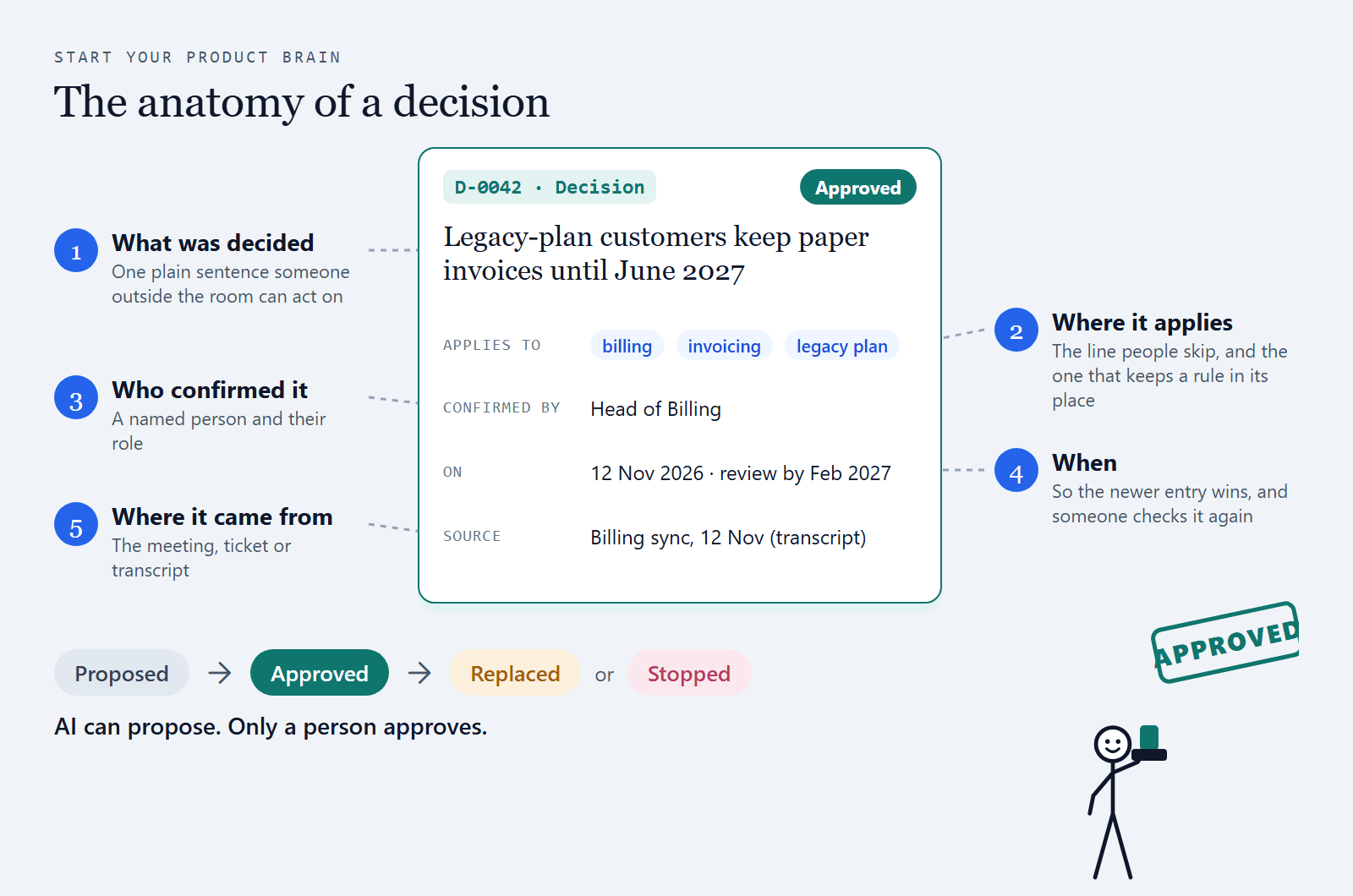
Open full size: The anatomy of a decision (opens in a new tab)
Every entry needs five things. Leave one out and the next person has to ask again:
- What was decided, in one plain sentence someone outside the room can act on.
- Where it applies: the product, the area, the client or the market. This is the line people skip, and the one that keeps a rule out of the wrong place.
- Who confirmed it, with their role.
- When it was confirmed, so the newer entry wins.
- Where it came from: the meeting, the ticket or the transcript.
Each entry also has a status: proposed (nobody has confirmed it yet), approved, replaced (kept, with a link to the newer entry) or stopped.
Start it this week:
- Make one place for it. A single page or file the whole team can open. One log beats five.
- Write the last five decisions about your product area, each with all five things.
- Capture as you go. Paste the capture prompt from section 8 into every AI chat where you decide something, and add what it produces to the log.
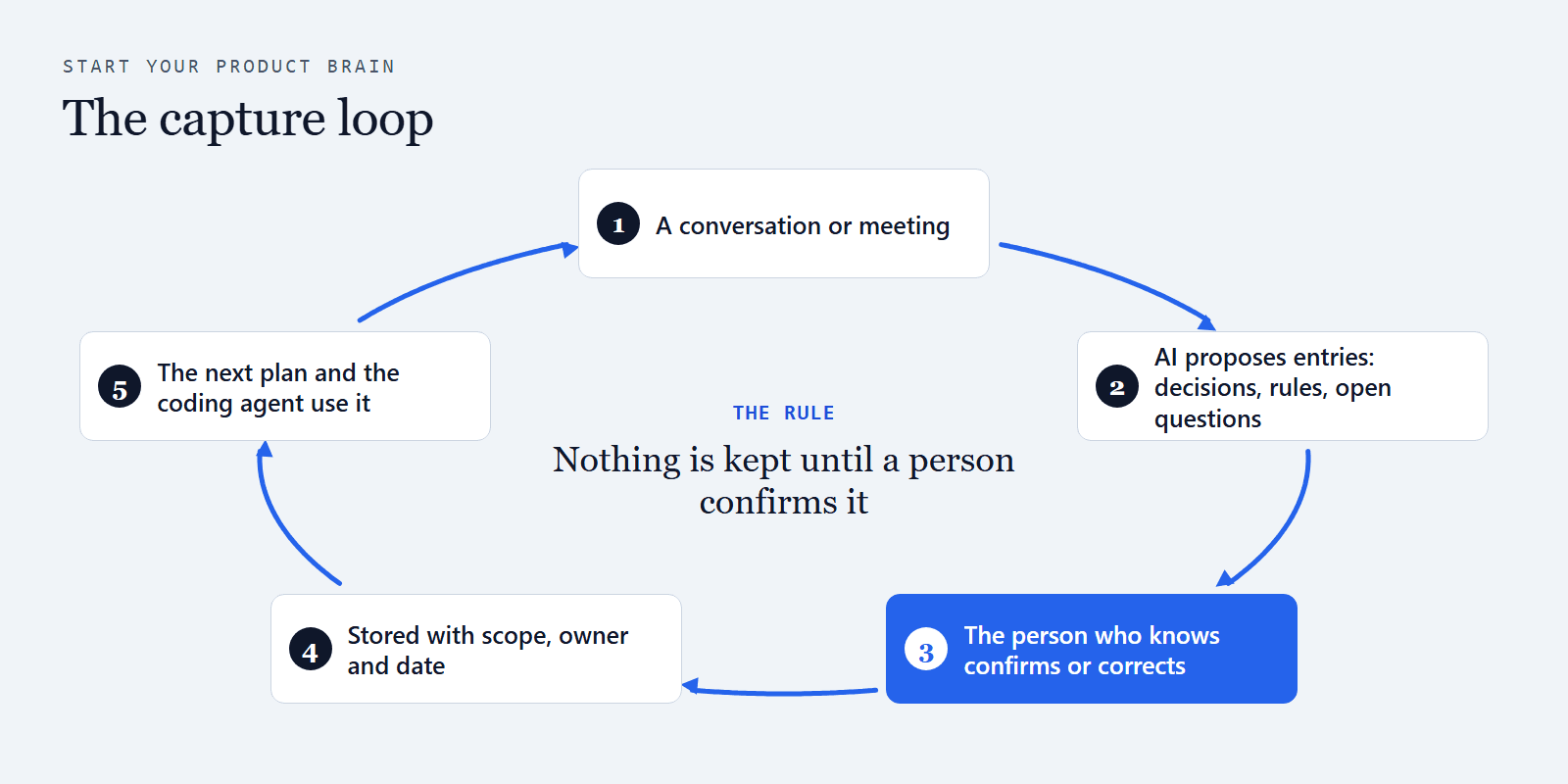
- Mine your note-taker. Take three recent meeting transcripts and ask your AI to propose entries from them, each quoting the line it came from. A person reads each proposal before it goes in.
Graduate when:
Go deeper: Free decision log template · Trace code back to the product decision
5. Stage 2, Shared: one brain every AI reads
Your stage
Stage 2Shared
One brain, read by everyone
- Where it lives
- One shared folder or repository
- Your AI
- Reads only approved entries that match the work
- Stuck on
- Plans still assume what nobody asked
- Graduate by
- Planning every feature in nine steps
When you hit Stage 2, the log moves to one place every person and every AI tool reads, so nobody works from a copy. Three ideas do most of the work:
- Scope before similarity. Load only what applies to this product, area or client, then look for what's relevant. Loading everything buries the rules that matter.
- A person confirms before anything counts. AI can propose an entry. Only a named person makes it approved.
- Later work reads only approved work. A plan builds on approved decisions and approved earlier steps, never on drafts.
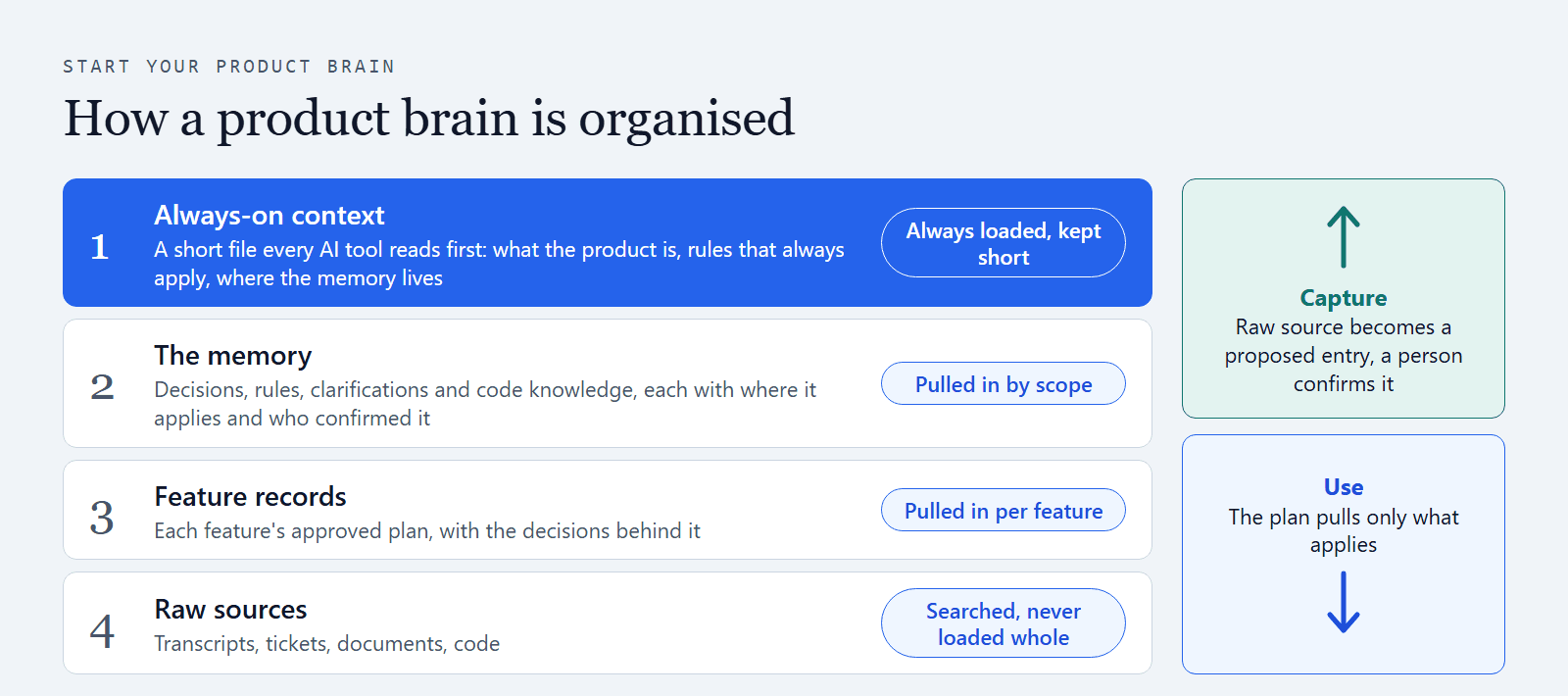
Open full size: How a product brain is organised (opens in a new tab)
Four levels of storage:
- Always-on context. One short file every AI tool reads first (AGENTS.md, with CLAUDE.md pointing to it): what the product is, a glossary, the rules that apply everywhere, and how to use the brain. Keep it short enough to read in two minutes: it is loaded on every turn.
- The memory. Decisions, rules, clarifications and code knowledge, one small file each, listed in an index. The AI reads the index, filters by scope and status, and opens only what matches.
- Feature records. Each feature's brief, its plan step by step, its questions and its handoff.
- Raw sources. Transcripts, tickets, documents. Entries point to them. The AI opens one only to check a claim, never all at once.
A folder that does this (a git repository, or a folder inside your product's repository):
product-brain/
  AGENTS.md            always loaded (CLAUDE.md points here)
  brain/
    INDEX.md           one line per entry: id, title, type, scope, status
    decisions/  rules/  clarifications/  code-notes/
    inbox/             proposed by AI, not yet confirmed
    open-questions.md
  steps/               the nine planning steps
  features/<name>/     brief, the nine steps, questions, handoff
  sources/             transcripts and notes, read on demand only
One entry, as a file:
---
id: D-0042
type: decision
title: Legacy-plan customers keep paper invoices until June 2027
status: approved          # proposed | approved | replaced | stopped
scope: {product: billing, area: invoicing, client: legacy-plan}
confirmed_by: "Head of Billing"
confirmed_on: 2026-11-12
source: sources/2026-11-12-billing-sync.md
supersedes: D-0017
review_by: 2027-02-12
---
The protocol, for AGENTS.md: "Read brain/INDEX.md. Open only approved entries whose scope matches the work. Treat proposed entries as undecided. Cite the entry IDs you rely on. Ask rather than assume."
Graduate when:
Go deeper: Product context for AI coding agents · Free coding-agent context file builder
6. Stage 3, Planned: nine steps before anyone builds
Your stage
Stage 3Planned
AI thinks it through first
- Where it lives
- The brain, plus a record for each feature
- Your AI
- Thinks every scenario through and asks before it assumes
- Stuck on
- Keeping it current takes time nobody has
- Graduate by
- Owners, a rhythm and health numbers
When you hit Stage 3, AI stops writing plans straight away. It works through nine planning steps first, so the questions it would otherwise answer with an assumption come up before the build. This is where predictability comes from.
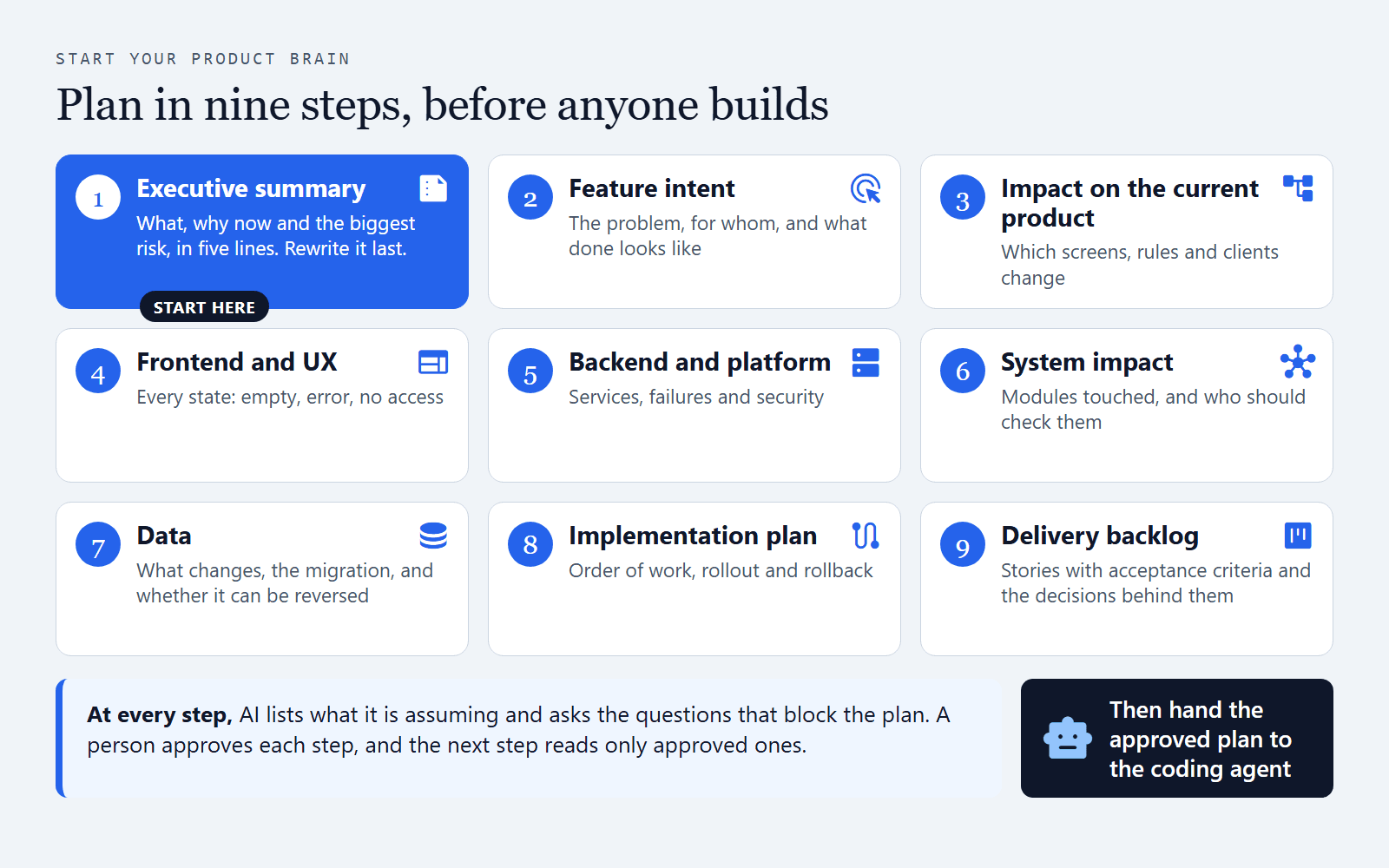
Open full size: Plan in nine steps, before anyone builds (opens in a new tab)
| Step | What AI must think through before it writes |
|---|---|
| 1. Executive summary | What AI must think through before it writesWhat it is, why now, the biggest delivery risk and how ready it is to build, in five lines anyone can read in 30 seconds. Write it first, so every person and AI knows what you're building. Rewrite it last, once the other steps are approved |
| 2. Feature intent | What AI must think through before it writesThe user problem, who it's for, today's workaround, the outcome, what's in and out of scope, and how you'll know it worked |
| 3. Impact on the current product | What AI must think through before it writesWhich screens, workflows, roles, data and integrations change, and whether each is new, changed, removed or unknown |
| 4. Frontend and UX | What AI must think through before it writesThe flow step by step, and every state: empty, loading, error, success, no permission. Validation, accessibility, mobile and copy |
| 5. Backend and platform | What AI must think through before it writesServices and endpoints touched, failures and how each is handled, background jobs, security and privacy needs |
| 6. System impact | What AI must think through before it writesWhich modules are touched and how they connect, with the risks and who should check them |
| 7. Data | What AI must think through before it writesWhat is added, changed or removed, migration and backfill order, whether each step can be reversed, retention |
| 8. Implementation plan | What AI must think through before it writesWhere to start, the steps in order by team, blockers, rollout and rollback |
| 9. Delivery backlog | What AI must think through before it writesStories from the user's view, each with acceptance criteria, priority, dependencies and the decisions behind it |
Four rules at every step:
- Cite the entries it relies on, by ID.
- Label every assumption with what would prove it wrong.
- List the questions that block it, each with the person who can answer.
- Wait for a person to approve the step. The next step reads only approved steps.
Then hand off. Build a handoff from the approved steps only: the objective, the plan, the rules in full, the decisions behind it, the open questions and the steps not needed, ending with "stop and ask if unsure". The coding agent starts from it, and every pull request says which entries the change touched.
Graduate when:
Go deeper: Requirements AI coding agents can follow
7. Your first week
Start with one product area and one feature you plan to build in the next month. A brain built around real work stays current. One built as a documentation project goes stale.
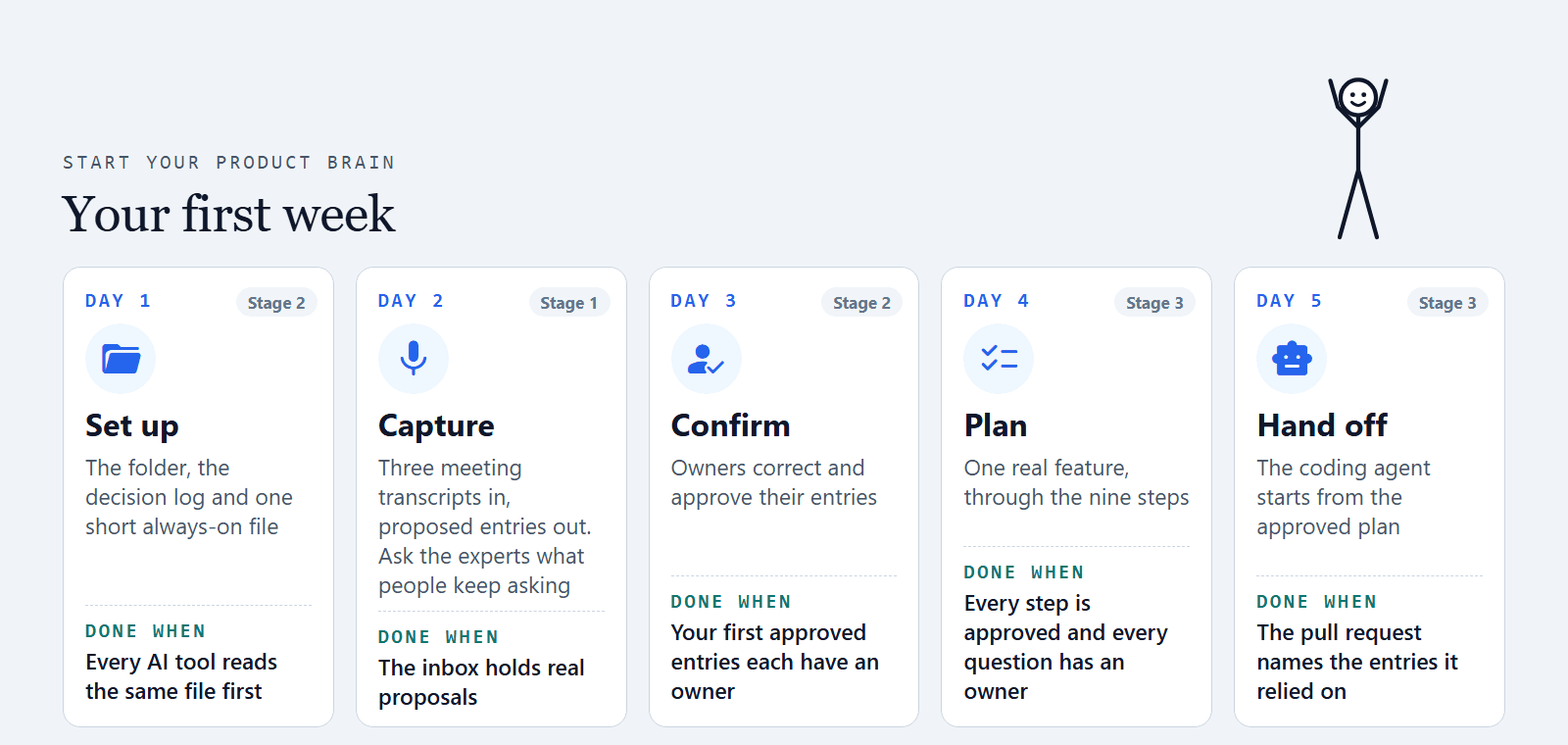
Day 1. Set up. Copy the starter kit, or create the folder from section 5. Write AGENTS.md: the product in five lines, the words your team uses, the rules that apply everywhere, and the protocol. Point CLAUDE.md and your other tools' rule files at it.
Day 2. Capture. Put three recent transcripts from your AI note-taker in sources/: a planning meeting, a client call and a design review. Ask your AI to propose entries into inbox/, each quoting the line it came from, suggesting a scope and who should confirm it, and flagging any approved entry it would contradict. Then book 30 minutes with the two or three people everyone queues for and ask: "What do people keep asking you?" Their answers become proposals too.
Day 3. Confirm. Each named person reads their proposals, corrects them and approves them. A pull request review works well: list an owner for each area, and only a person ever sets an entry to approved. Write the last five decisions about your area the same way.
Day 4. Plan. Take the real feature through the nine steps, starting with a five-line executive summary. A person approves each step before the next one starts.
Day 5. Hand off. Build the handoff from the approved steps and give it to the coding agent. Check that its pull request names the entries it relied on. You've reached Stage 3.
8. Prompts you can use today
You don't need the whole setup to start. Paste these into Claude, Copilot or ChatGPT.
Capture what you decide:
When we decide something about [product], write it down as a decision: what we decided, where it applies, who confirmed it, the date, and where it came from. List anything you assumed but nobody confirmed as an open question. Keep these in one list I can add to our decision log.
Think it through before planning:
Before you write a plan for [feature], start with a five-line summary: what it is, why now, the biggest risk and how ready it is. Then work through each of these: the user problem and what's out of scope; which existing screens, rules and clients it touches; every screen state including errors and no access; the services and failures; the data and how a change could be reversed; the order of work and rollback. For each one, list what you're assuming and what would prove it wrong. Stop and ask me the questions that block the plan before you write it.
Check against what's already decided:
Before you change anything, read our decision log and rules. Use only approved entries whose scope matches this work. If anything you're about to do contradicts an approved entry, stop and tell me which one.
9. Stage 4, Trusted: owners, a rhythm and numbers
Your stage
Stage 4Trusted
Answers people vouch for
- Where it lives
- Every entry has an owner and a review date
- Your AI
- Works from answers people stand behind
- Stuck on
- The work multiplies with people, clients and tools
- Graduate by
- A system that keeps it current for you
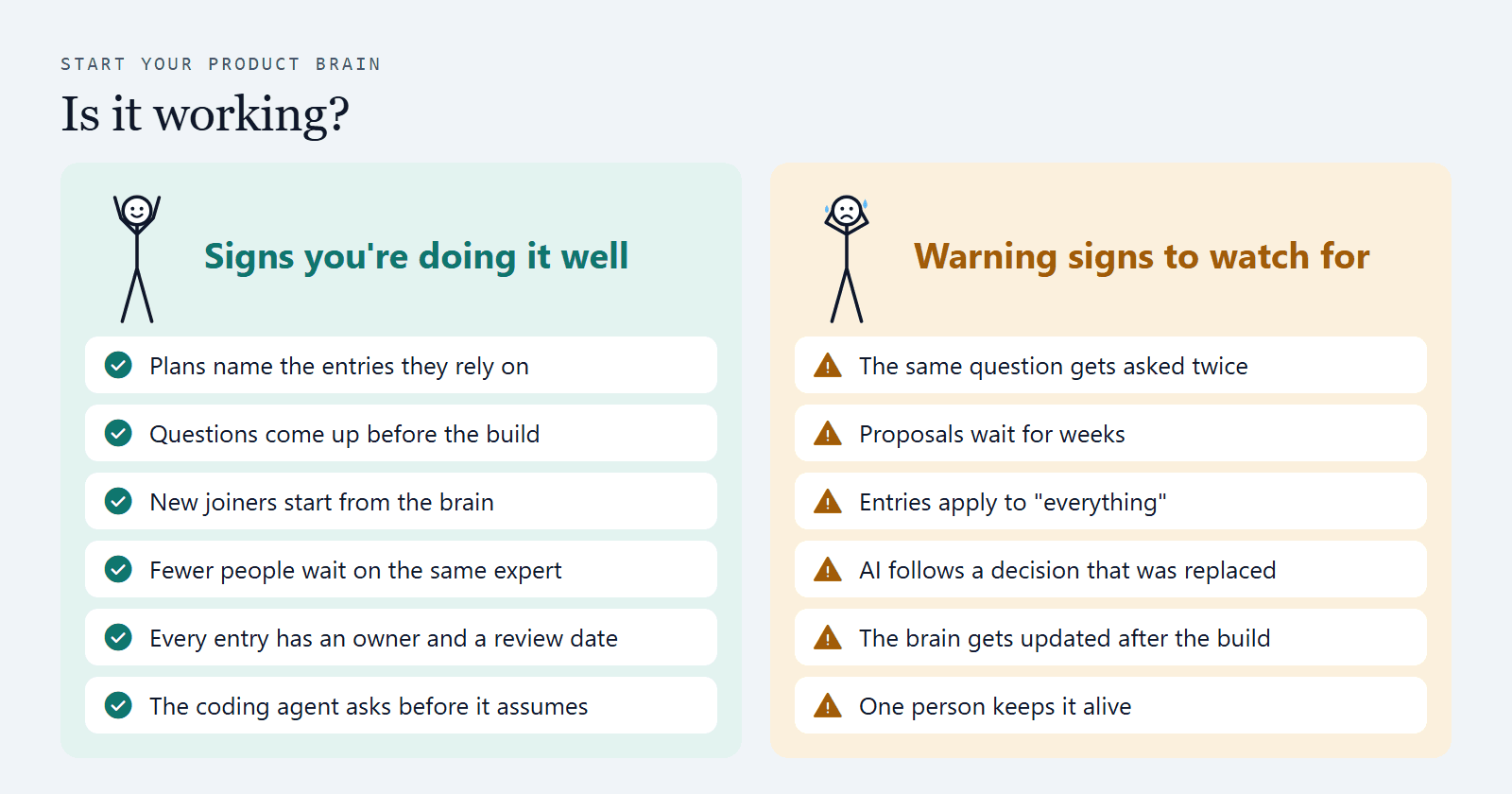
When you hit Stage 4, people stop double-checking the brain and start relying on it. That trust comes from two things: every entry has a named owner, and you can see its health at a glance.
The rhythm:
- Weekly, 15 minutes: clear the inbox and the open questions.
- Monthly: owners check every entry past its review date. Still true? Approve it again, replace it or stop it.
- At every feature kickoff: run the readiness questions and add the answers.
- New joiners read the brain before their first feature.
The health numbers to watch (the starter kit's health script counts them for you):
| Number | Why it matters |
|---|---|
| Open questions, and how old they are | Why it mattersOld questions are the gaps that turn into rework |
| Entries with no owner or confirmer | Why it mattersNobody to ask, and nothing to trust |
| Approved entries past their review date | Why it mattersStale rules are worse than no rules |
| Replaced or stopped entries still cited somewhere | Why it mattersThe AI may still be following the old decision |
| Proposals waiting more than two weeks | Why it mattersThe capture loop has stalled |
| Entries scoped to "everything" | Why it mattersA rule for one client will leak into the wrong place |
Graduate when:
Go deeper: Onboard a new PM to an established product
10. Do you want to scale to the next step?
Open full size: Do you want to scale to the next step? (opens in a new tab)
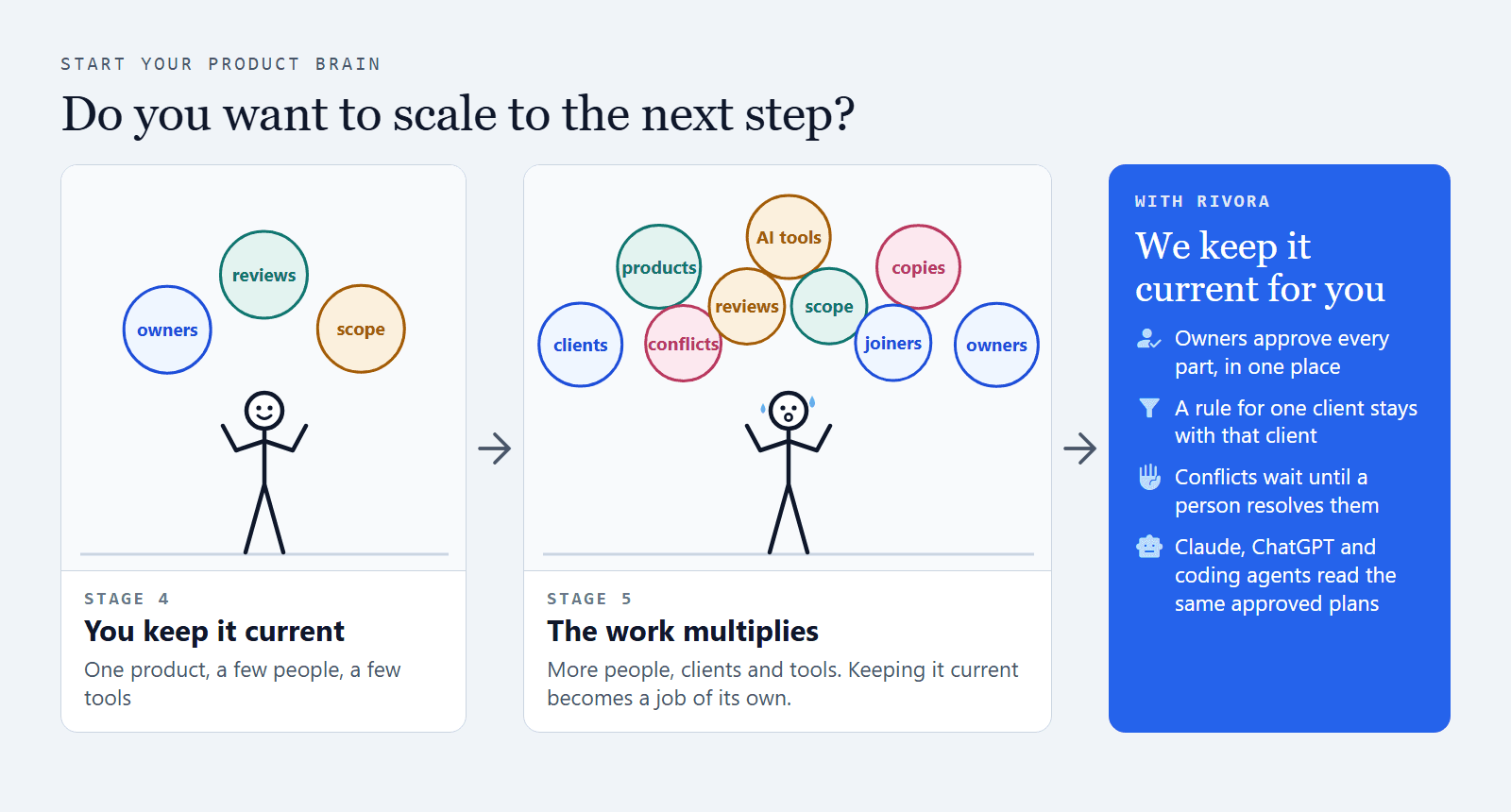
Stage 4 is where doing it yourself gets heavy. Doing this for one product, with a few people, works well, and it's worth doing this week. Then the product grows, and keeping the brain current becomes a job of its own:
- More people. The confirmers become the bottleneck. Some PMs won't use git. "Confirmed by" is typed by hand, and nobody checks it.
- More clients and products. Scope depends on the AI filtering honestly. One folder shows every client's rules to everyone. After a few hundred entries, the index no longer fits in the AI's context.
- More AI tools. Claude and ChatGPT projects hold uploaded copies that go stale. AGENTS.md, CLAUDE.md and the Cursor rules drift apart.
- All the time. Conflicts are found by eye. Approval is a convention the AI can ignore. Nobody can see what the AI actually read before it wrote a plan.
If you feel stuck, or the work multiplies with more people, clients and tools, and nobody has the time to keep it current: bring in Rivora. It keeps doing this for you, with clear owners and a record you can rely on.
Your stage
Stage 5Scaled
One brain across the business
- Where it lives
- One brain across teams, clients and products
- Your AI
- Every tool reads the same approved answers
- Who keeps it
- Rivora, with your owners approving
- What you get
- Features planned from everything your team confirmed
Rivora Connect is an AI product brain for product teams on established software. Your team designs each feature in Rivora, and the answers you keep are reused on the next one.
| The job | Doing it yourself | With Rivora |
|---|---|---|
| Asking the right questions | Doing it yourselfA prompt, if someone remembers to run it | With RivoraRivora drafts each part of a feature's solution and asks the questions it can't answer, while the feature is designed |
| Thinking it through | Doing it yourselfNine step files and a long prompt | With RivoraEach of the nine parts has its own checks. Later parts read only approved earlier parts |
| Confirming | Doing it yourselfPull request reviews, "confirmed by" typed by hand | With RivoraA person approves, edits or sends back every part. Nothing is learned silently: memory comes from what people say and confirm |
| Keeping scope | Doing it yourselfThe AI filters on trust | With RivoraSaving an answer means choosing what it is and where it applies. A rule for one client stays with that client |
| Conflicts | Doing it yourselfFound by eye | With RivoraTwo live entries on the same subject and scope are held back until a person resolves them |
| Proposals from AI | Doing it yourselfAn inbox folder | With RivoraItems the AI finds wait for a person's approval before they are ever used |
| What the AI read | Doing it yourselfUnknown | With RivoraEach part shows the sources it used |
| Handoff | Doing it yourselfA handoff file written by hand | With RivoraApproved stories go to Jira with a person's OK. Coding agents such as Claude Code, Cursor and Codex get the approved plan with the rules in full |
| Keeping it current | Doing it yourselfA monthly check | With RivoraReplaced decisions are kept and marked. Rules can be stopped. The next feature starts with everything your team confirmed |
Rivora reads your code through a GitHub App with read-only access and never changes it. Your team can also read approved plans from Claude or ChatGPT, where Rivora is listed in their directories (how that works). Rivora is in early access, with core hosting on AWS in Sydney.
How we help, one step at a time:
- A free 30-minute session: your setup today, and where AI can help. Booking details are at the end of this guide.
- One feature, mapped: after the session, if a feature starts in the next month, we map it: the questions to answer before engineering commits, who holds each, and where rework risk sits. One page, within two working days.
- The Guided Pilot: one real feature, four weeks, designed with your team in Rivora.
About the author
Anurag Kapse has spent more than a decade in tech, across products and agency delivery, carrying what clients wanted to the people who build it. He built Rivora to help product teams on this journey: to use AI in the best possible way for their products, without burning out.
Anurag Kapse · anurag@rivoraconnect.com.au · LinkedIn (opens in a new tab)
Sources. Jaroslawicz and others, "How Many Instructions Can LLMs Follow at Once?" (IFScale benchmark, Distyl AI, July 2025), arxiv.org/abs/2507.11538 (opens in a new tab). Anthropic, "Claude Code best practices", code.claude.com/docs/en/best-practices (opens in a new tab).
Your next step
Pick a slot that suits you. Bring this guide and the stage you think you’re at, and we’ll work through where your product knowledge lives and what your AI tools can’t see. You get a written summary within five working days.